SurrealDB
Querying Overview
Qarbine utilizes the SurrealQL query language to access cloud data. Its native querying support enables maximum expressiveness and access to SurrealDB’s features. Qarbine query results allow retrieving both flat and nested values to maximize business data model benefits. In general the underlying “rows” are returned in their native form. Unlike the requirements of legacy SQL-centric tools, the rows processed by Qarbine can be arbitrarily complex JSON objects.
Qarbine supports a variety of SurrealDB queries use cases across differing models:
- general JSON object rows,
- graph,
- vector,
- geospatial, and
- time-series.
A good starting point for understanding SurrealQL is at https://surrealdb.com/docs/surrealql.
Qarbine also provides convenient virtual queries for simple schema requests.
Sample Analysis
Qarbine provides a robust set of features for flexible analysis. Here is an example that uses Qarbine Prompts, Data Sources, and Templates.
Running the template presents a prompt to the user to obtain SurrealQL query placeholder values.
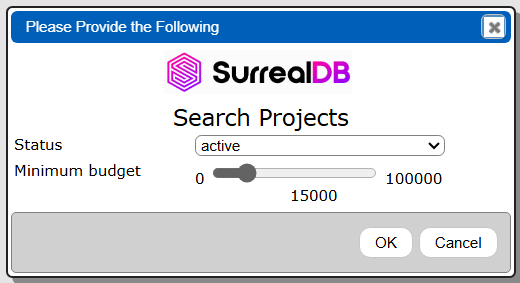
The status drop down has

The data source specification has to handle the case where ‘any’ is chosen as it formats the final SurrealDB query. This is done using Qarbine’s macro language block enclosed within ‘[! ... !]” shown below.
SELECT * OMIT id
FROM project
WHERE [! if (@status = 'any', '', unquote( concat(" status = ", quote(@status), " AND ") ) ) !]
 budget > @minBudget;
With a status of ‘any’ and a minimum budget of 20000 the resulting query is
SELECT * OMIT id
FROM project
WHERE budget > 20000;
With a status of ‘active’ and a minimum budget of 20000 the resulting query is
SELECT * OMIT id
FROM project
WHERE status = ‘active’ AND budget > 20000;
The answer set returned from SurrealDB is then processed based on the template definition to generate the result. Sample results are shown below.
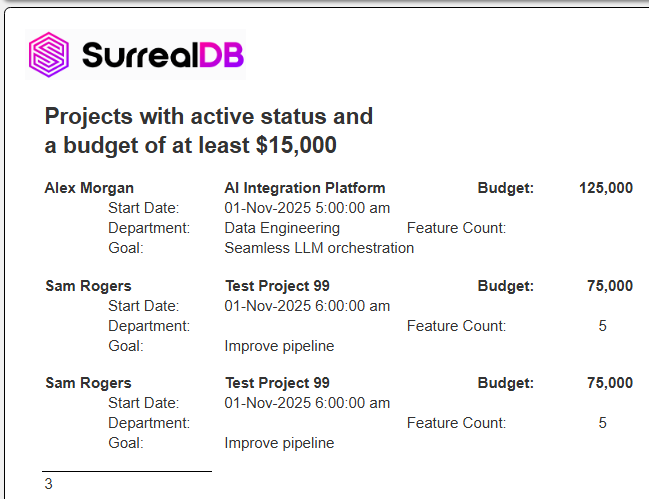
The template can be found at “example/SurrealDB/Active projects with @status and budget > @minBudget”. It references the Data Source at “example/SurrealDB/Active projects with @status and budget > @minBudget”.
A sample project element is shown below.
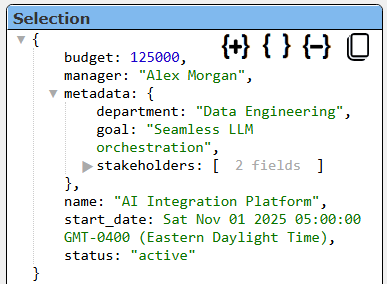
Qarqbine is perfectly fine with such as complex JSON object structure.
SurrealDB Instance Queries
There are several example in the “example/SurrealDB/DBA” folder. Refer to the SurrealDB documentation for the details of the returned values.
To retrieve the databases in the current namespace run
INFO FOR NS;
The basic results are shown below.

To retrieve the tables in the current database run
INFO FOR DB;
The basic results are shown below.

To retrieve a table’s structure information run
INFO FOR TABLE <tableName>;
The basic results are shown below.

General Searches
Consider the following sample case.
DEFINE TABLE project SCHEMAFULL;
DEFINE FIELD budget     ON project TYPE number;
DEFINE FIELD manager    ON project TYPE string;
DEFINE FIELD name       ON project TYPE string;
DEFINE FIELD status     ON project TYPE string;
DEFINE FIELD start_date ON project TYPE datetime;
DEFINE FIELD metadata   ON project TYPE object;
CREATE project:asy7f7c55xq1hp7oabqw SET
  budget     = 125000,
  manager    = "Alex Morgan",
  name       = "AI Integration Platform",
  status     = "active",
  start_date = "2025-11-01T09:00:00.000Z",
  metadata   = {
    department:  "Data Engineering",
    goal:        "Seamless LLM orchestration",
    stakeholders: ["CTO", "Head of Product"]
  };

CREATE project:nsn3n662nlbnpsx258qv SET
  budget     = 85000.5,
  manager    = "Priya Patel",
  name       = "Mobile Redesign",
  status     = "completed",
  start_date = "2025-09-15T09:00:00.000Z",
  metadata   = {
    goal:       "Modernize UX",
    platform:   "iOS/Android",
    team_size:  8
  };
CREATE project:atarxcjr968nl8p58shb SET
  budget     = 75000,
  manager    = "Sam Rogers",
  name       = "Test Project 99",
  status     = "active",
  start_date = "2025-11-01T10:00:00.000Z",
  metadata   = {
    goal:          "Improve pipeline",
    feature_count: 5,
    custom: {
      foo: "bar"
    }
  };
CREATE project:kl79f8rm44x2a5q18a2e SET
  budget     = 75000,
  manager    = "Sam Rogers",
  name       = "Test Project 99",
  status     = "active",
  start_date = "2025-11-01T10:00:00.000Z",
  metadata   = {
    goal:          "Improve pipeline",
    feature_count: 5,
    custom: {
      foo: "bar"
    }
  };
CREATE project:f0qz4vablmalxmmmsrbd SET
  budget     = 42000,
  manager    = "John Park",
  name       = "Security Audit",
  status     = "pending",
  start_date = "2025-10-05T09:00:00.000Z",
  metadata   = {
    compliance: ["PCI", "GDPR"],
    deadline:   "2025-12-20",
    vendor:     "CyberSafe Inc."
  };
A general query is
SELECT *
FROM project
WHERE status = "active"
  AND budget > 5000;
The general results are shown below.

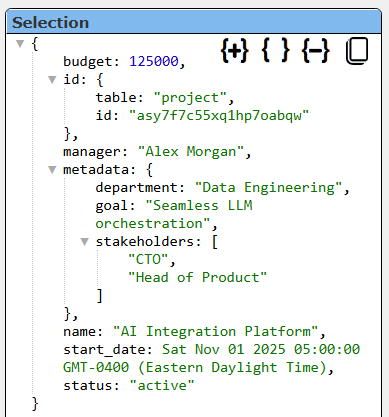
The details of an element are shown below. Notice the complex JSON structure which is easily processed by Qarbine.
Using Pragmas to Manipulate Answer Sets
Overview
The queries to your data may be defined using multiple lines of text for formatting and other purposes. Qarbine pragmas allow the manipulation of the answer set after the initial reply from SurrealDB. There are a large number of pragmas described in the main Data Source Designer guide within the Tools section of doc.qarbine.com
Graph Searches
Consider the following sample case.
CREATE user:mcuserson SET name = "User McUserson";
CREATE comment:one SET text = "I learned something new!";
RELATE user:mcuserson->wrote->comment:one
    SET location = "Arizona", os = "Windows 11", mood = "happy";
A general query is
SELECT ->wrote->comment.* AS comments
FROM user:mcuserson;
Qarbine Virtual Queries
There are a few convenience queries which are mainly DBA oriented. These queries are recognized by the Qarbine driver and provide common database information.
| Query | Description |
|---|---|
| LIST DATABASES | Return a list of databases. |
| LIST TABLES | Return a list of tables. |
| LIST TABLES IN database | Return a list of tables in the given database. |
| DESCRIBE TABLE table IN database | Provide details of the given table in the given database. |
See the “DBA Productivity” section of the online documentation for more details.
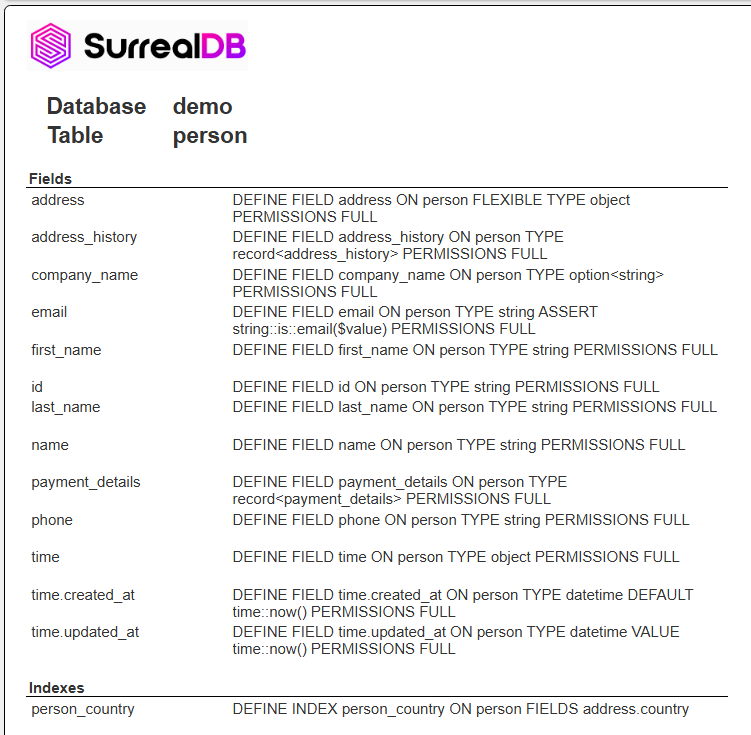
To get details on a particular table run “example/SurrealDB/DBA/Describe @table in @database”. It prompts for a database and an associated table.
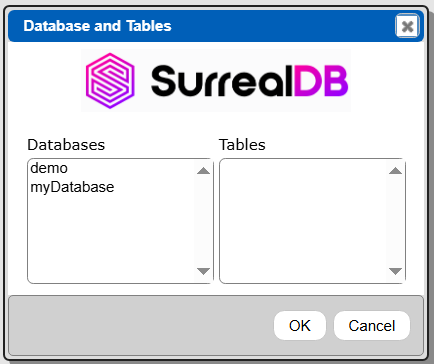
Choose the database and table.
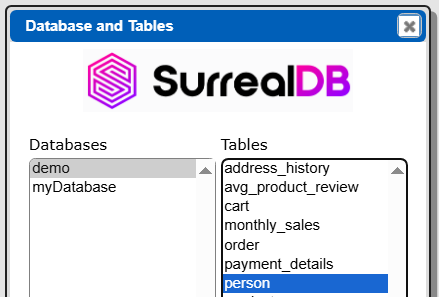
Click OK.
The database and table names are based on the data service referenced within the Qarbine prompt definition. That detail is shown briefly below.

Sample template output is shown below.
Vector Searches
You can use cosine similarity, Euclidean, or other metricsfor your queries. In general,
- use vector::similarity::cosine(array, array) for semantic/text embeddings.
- use vector::similarity::euclidean(array, array) for basic geometric search.
Consider the following sample case.
DEFINE TABLE ai_task SCHEMAFULL;
DEFINE FIELD title       ON ai_task TYPE string;
DEFINE FIELD description ON ai_task TYPE string;
DEFINE FIELD embedding   ON ai_task TYPE array<float>;
DEFINE INDEX idx_ai_task_embedding
  ON TABLE ai_task
  COLUMNS embedding;

CREATE ai_task SET
  title       = "Summarize product reviews",
  description = "Generate a short summary of recent customer reviews for a product.",
  embedding   = [0.10, 0.25, 0.80, 0.30];
CREATE ai_task SET
  title       = "Answer product questions",
  description = "Use documentation and FAQs to answer customer questions about a product.",
  embedding   = [0.15, 0.20, 0.75, 0.35];
CREATE ai_task SET
  title       = "Detect sentiment in feedback",
  description = "Identify whether customer feedback is positive, negative, or neutral.",
  embedding   = [0.80, 0.10, 0.20, 0.05];
CREATE ai_task SET
  title       = "Route support tickets",
  description = "Classify incoming support tickets to the right team or topic.",
  embedding   = [0.70, 0.15, 0.25, 0.10];
CREATE ai_task SET
  title       = "Generate marketing copy",
  description = "Draft short marketing blurbs for email or social media.",
  embedding   = [0.20, 0.85, 0.10, 0.40];
A general query is
LET $queryVector = [0.10, 0.20, 0.25, 0.30];
SELECT  id, embedding, title,
  vector::similarity::cosine(embedding, $queryVector) AS similarity
FROM ai_task
ORDER BY similarity DESC
LIMIT 5;
The returned records are sorted by similarity, giving you the top 5 similar matches.
An alternative technique is to replace this line
LET $queryVector = [0.10, 0.20, 0.25, 0.30];
with an explicit variable reference with the embedding or a Qarbine macro function to dynamically obtain the embedding.
LET $queryVector = [! embed('someString', 'myAiAssistantAlias') !];
Geospatial Searches
For query clauses like
geo::distance($paris, location) AS meters
the units of measure include meters, kilometers, and miles.
More information on SurrealDB geospatial queries can be found at
and
Consider the following sample case.
DEFINE TABLE city SCHEMAFULL;
DEFINE FIELD name     ON city TYPE string;
DEFINE FIELD location ON city TYPE point;
-- Optional: index on location for faster geo queries later
DEFINE INDEX city_location_idx ON city FIELDS location;
CREATE city SET
  name     = "Berlin",
  location = {
    type: "Point",
    coordinates: [13.405, 52.52]
  };
CREATE city SET
  name     = "London",
  location = {
    type: "Point",
    coordinates: [-0.118092, 51.509865]
  };
CREATE city SET
  name     = "Paris",
  location = {
    type: "Point",
    coordinates: [2.352222, 48.856613]
  };
CREATE city SET
  name     = "New York",
  location = {
    type: "Point",
    coordinates: [-74.0060, 40.7128]
  };
CREATE city SET
  name     = "Tokyo",
  location = {
    type: "Point",
    coordinates: [139.6917, 35.6895]
  };
CREATE city SET
  name     = "Sydney",
  location = {
    type: "Point",
    coordinates: [151.2093, -33.8688]
  };
CREATE city SET
  name     = "San Francisco",
  location = {
    type: "Point",
    coordinates: [-122.4194, 37.7749]
  };
CREATE city SET
  name     = "Toronto",
  location = {
    type: "Point",
    coordinates: [-79.3832, 43.6532]
  };
CREATE city SET
  name     = "Singapore",
  location = {
    type: "Point",
    coordinates: [103.8198, 1.3521]
  };
CREATE city SET
  name     = "São Paulo",
  location = {
    type: "Point",
    coordinates: [-46.6333, -23.5505]
  };
CREATE city SET
  name     = "Mumbai",
  location = {
    type: "Point",
    coordinates: [72.8777, 19.0760]
  };
CREATE city SET
  name     = "Johannesburg",
  location = {
    type: "Point",
    coordinates: [28.0473, -26.2041]
  };
CREATE city SET
  name     = "Mexico City",
  location = {
    type: "Point",
    coordinates: [-99.1332, 19.4326]
  };
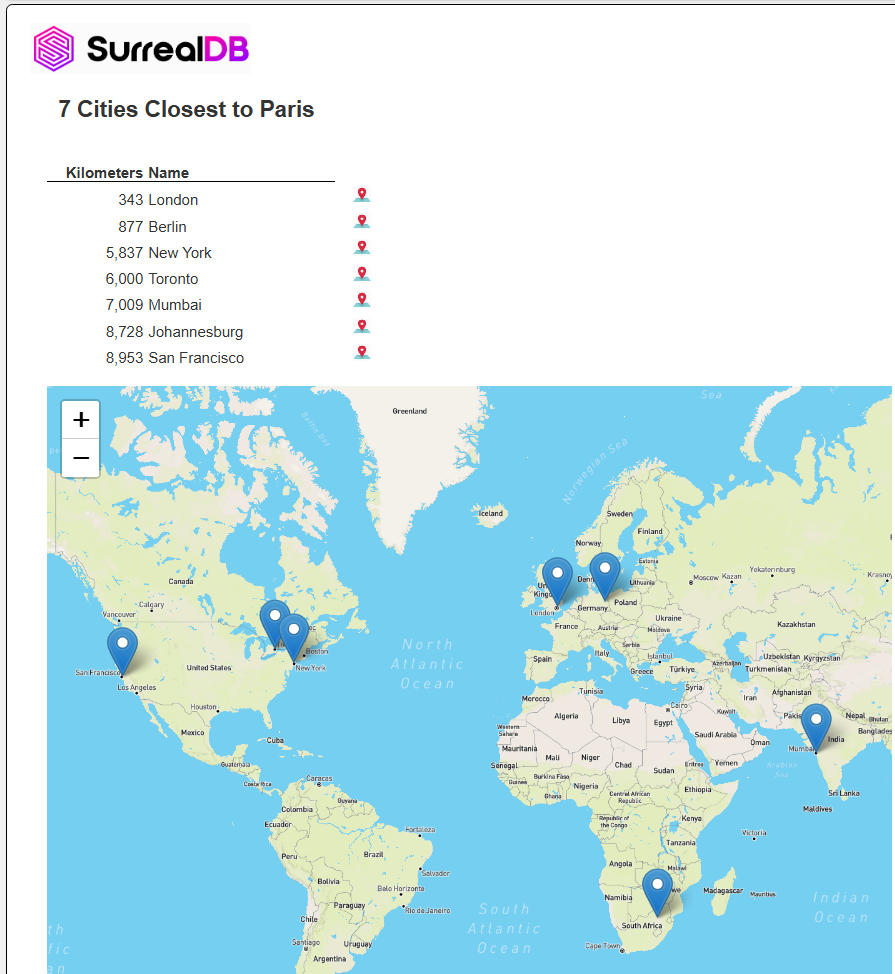
Here is a query for the 5 closets cities to Paris.
LET $paris = (SELECT location
FROM city
WHERE name = "Paris" LIMIT 1)[0].location;
SELECT name, location,
  geo::distance($paris, location) AS meters
FROM city
ORDER BY meters ASC
LIMIT 8;
Here is sample generated output from the template found at “example/SurrealDB/Sample geospatial distances from Paris query”. It uses custom cells to open a map on a specific location and also to show many points on a map.
Here is template output which contains a custom cell to open a map on a geo coordinate.
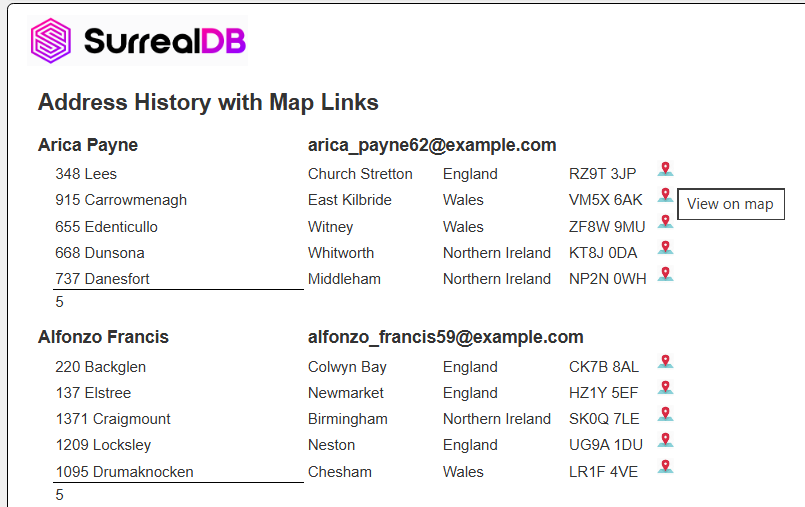
The template is at “example/SurrealDB/Address history with map link”.
Time-series Searches
Consider the following sample case.
DEFINE TABLE sensor_readings SCHEMAFULL;
DEFINE FIELD ts        ON sensor_readings TYPE datetime;
DEFINE FIELD value     ON sensor_readings TYPE number;
DEFINE FIELD sensor_id ON sensor_readings TYPE string;
INSERT INTO sensor_reading [
  { sensor_id: "sensor-1", ts: "2025-11-26T07:55:18.006Z", value: 21.3 },
  { sensor_id: "sensor-1", ts: "2025-11-26T07:58:18.007Z", value: 22.1 },
  { sensor_id: "sensor-1", ts: "2025-11-26T08:00:18.007Z", value: 22.8 },
  { sensor_id: "sensor-1", ts: "2025-11-26T08:03:18.007Z", value: 22.5 },
  { sensor_id: "sensor-1", ts: "2025-11-26T08:06:18.007Z", value: 21.9 },
  { sensor_id: "sensor-1", ts: "2025-11-26T08:09:18.007Z", value: 22.2 },
  { sensor_id: "sensor-1", ts: "2025-11-26T08:12:18.007Z", value: 21.8 },
  { sensor_id: "sensor-1", ts: "2025-11-26T08:15:18.007Z", value: 22.4 },
  { sensor_id: "sensor-1", ts: "2025-11-26T08:18:18.007Z", value: 22.0 },
  { sensor_id: "sensor-1", ts: "2025-11-26T08:21:18.007Z", value: 22.7 },
  { sensor_id: "sensor-1", ts: "2025-11-26T08:24:18.007Z", value: 21.6 },
  { sensor_id: "sensor-1", ts: "2025-11-26T08:27:18.007Z", value: 21.9 },
  { sensor_id: "sensor-1", ts: "2025-11-26T08:30:18.007Z", value: 22.3 },
  { sensor_id: "sensor-1", ts: "2025-11-26T08:33:18.007Z", value: 22.6 },
  { sensor_id: "sensor-1", ts: "2025-11-26T08:36:18.007Z", value: 21.7 },
  { sensor_id: "sensor-1", ts: "2025-11-26T08:39:18.007Z", value: 21.5 },
  { sensor_id: "sensor-1", ts: "2025-11-26T08:42:18.007Z", value: 22.0 },
  { sensor_id: "sensor-1", ts: "2025-11-26T08:45:18.007Z", value: 22.4 },
  { sensor_id: "sensor-1", ts: "2025-11-26T08:48:18.007Z", value: 22.1 },
  { sensor_id: "sensor-1", ts: "2025-11-26T08:51:18.007Z", value: 21.9 },
  { sensor_id: "sensor-1", ts: "2025-11-26T08:54:18.007Z", value: 22.3 },
  { sensor_id: "sensor-1", ts: "2025-11-26T08:57:18.007Z", value: 22.6 },
  { sensor_id: "sensor-1", ts: "2025-11-26T09:00:18.007Z", value: 22.0 },
  { sensor_id: "sensor-1", ts: "2025-11-26T09:03:18.007Z", value: 21.8 }
];
Here is a query for the last N minutes for a sensor.
SELECT *
OMIT id, sensor_id
FROM sensor_reading
WHERE sensor_id = "sensor-1"
AND ts >= "2025-11-26T08:00:18.007Z"
ORDER BY ts
LIMIT 15;
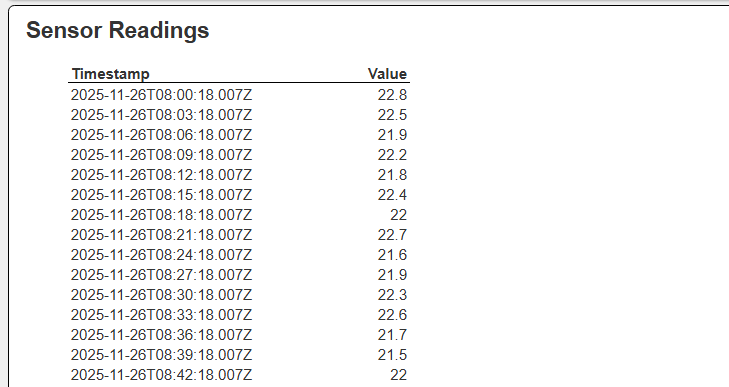
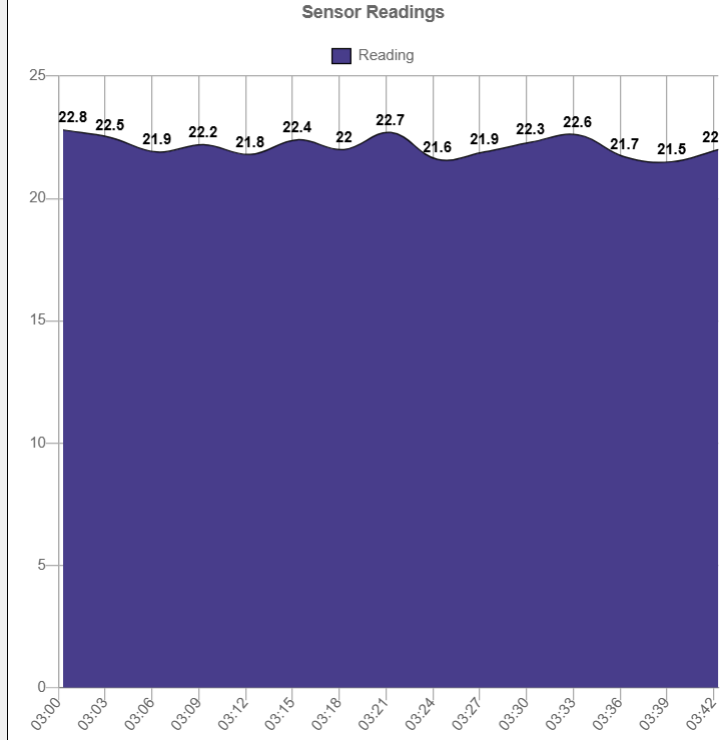
Shown below is the template at “example/SurrealDB/Sample time series query 1”.